You down with GPD? Yeah, You Know Me!

Good luck getting that out of your head!

What is GPD?  Gamified Professional Development.  Microcredentialing, badging, gamification… these seem to be the latest and greatest buzzwords in education.  Normally, I am immediately turned off by buzzwords.  For example: “21st Century Learning”… y’all, it’s 2018 – for the love of everything holy, let’s move on from that one, please!  “Innovation”… putting a worksheet in Google Classroom is NOT innovation, it’s a digital worksheet.  “Project-Based Learning”… doing a class project at the end of a unit does not merit the label of PBL.  I get frustrated because the buzzword becomes a “thing” and everyone rushes to do “the thing” without giving “the thing” any real thought or due diligence.

With that small rant behind me (I’m sure it won’t be the last though), I have to say I’m a huge fan of the move toward gamifying professional development.  For the first 8(ish) years of my career, professional development was the one thing I dreaded more than any other.  Give me all the paperwork, grades, conferences, faculty meetings, or any other <insert educational acronym here>, and I’ll do it with a smile on my face.  Give me some ridiculous professional development where I sit through an hour workshop of something someone with a higher pay grade than me thought I needed to know, and I was immediately rolling my eyes and mentally checked out.  I had numerous CEUs from professional development I’d attended, but hadn’t learned a single thing, other than how to refine my ability to pass notes more stealthily.  Then, Lucas Gillispie was hired by my district in 2014 and his first PD with us was #Education, in which I learned what I was missing in professional development.  I realized that I needed to personalize my professional development.  I immediately started using Twitter professionally and following the folks Lucas recommended following; my Twitter PD exploded from that moment.

I continued to learn from Lucas as a pilot participant in the gamified professional development he created called “EPIC Academy” in 2015.  I was immediately hooked by the aspect of a leaderboard and earning points!  Above all else, the learning that happened here was RELEVANT!  If the quest didn’t pertain to what I needed at the time, I just dropped the quest and chose something else.  I had CHOICE in what I learned.  The quests in EPIC Academy were designed to be bite-sized pieces of information.  Showing mastery of each bite led to another bite, and before you know it, you’ve created a product that shows mastery of something much bigger.

In 2016, Lucas asked me to come onboard as a quest designer for EPIC.  I was terrified as this was “his baby” and I wanted to be sure to maintain the level of awesome he had precedented, while keeping the “buzzword” aspect out of it.  I wanted to give each quest I designed the forethought it deserved, and have participants create a product that was relevant and useful to them and their learners.  I designed the quest chains for Augmented Reality and Digital Formative Assessment that year.  Since then, I have been privileged to design the quest chains for Digital Storytelling, BreakoutEDU, Digital BreakoutEDU, Teacher Productivity Tools, Classcraft, and BreakoutEDU 2.0.

EPIC Academy has taken off exponentially since 2016.  Lucas applied for, and was awarded, a Digital Learning Initiative Showcase Grant from the NC Department of Public Instruction to expand EPIC Academy, to connect and share the content to educators from across the state.  As part of this grant, Lucas designed a model for mentors to assist those in EPIC Academy.  As an EPIC Mentor, we support and encourage educators new to the gamified professional development world.

Screen Shot 2018-04-29 at 7.57.15 PM

I have watched this model flourish under Lucas’s leadership.  There are no educators in EPIC that were required to join; participation is completely optional.  With some of the latest buzzwords being “microcredentialing”, “badging”, “gamification”, I am thankful that EPIC Academy is untarnished by the effects of buzzwords thus far.  Through EPIC alone, I have gained over 8 Digital Learning Competency CEUs, but more importantly, my students and staff have been exposed to the benefits of Google Drive, Coding, Skype, Augmented Reality, Digital Formative Assessment, YouTube, Virtual Field Trips, BreakoutEDU, Flipgrid, Appsmashing, QR Codes, Game Based Learning, and much more.  My teaching has been taken to the next level, and my desire for continuing learning is piqued.  GPD is the way to create life-long learners of educators; the days of one-hour professional development is ancient history for me. So… who’s down with GPD?

Media Makeover

There’s a saying “form follows function”.  I’m sure you’ve also heard “if you build it, they will come”.  Basically, my media center needed to reflect the changes that we hoped the pilot would bring to the culture of the school and the vision for media centers throughout the district.  The media space at my school was perfect for the school when it opened in 2000.  Based on new trends in education, and push for Future Ready schools, the use of the space was no longer adequate.  The physical space desperately needed to be updated and the collection needed to be heavily weeded.

Makerspace

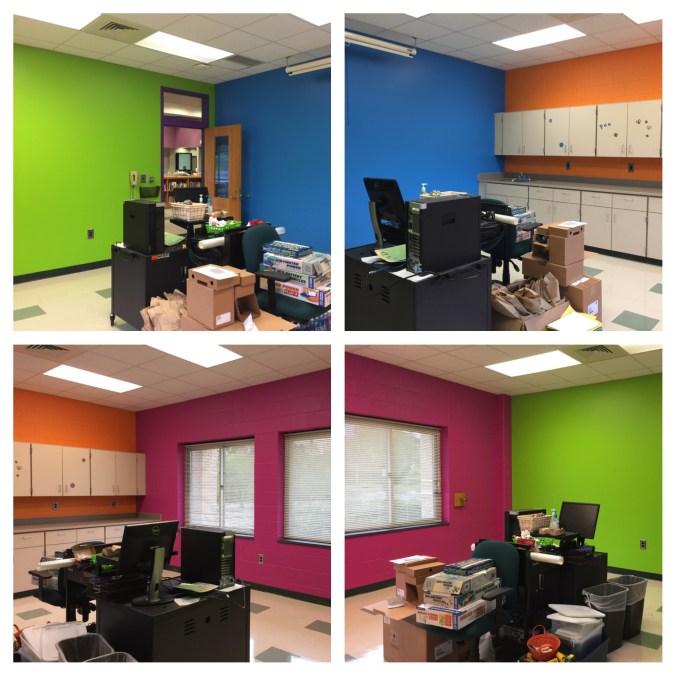
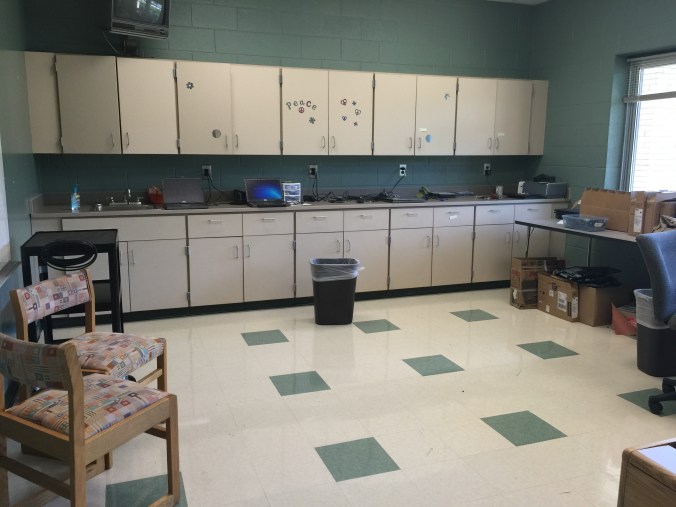
We started with a good-sized classroom off the media center.  It previously functioned as the technician’s workspace, but I immediately envisioned a makerspace there.  It already had a sink, tile floors, a solid wall, and lots of storage.  I was also trying to break the habit of sending broken chromebooks to the media center, so I felt that having the technician in that space was counter-intuitive.  The technician at our school graciously moved to another space in the school, and a fresh coat of paint, in some pretty cool colors was the beginning of a makerspace.

IMG_4841

Before

IMG_4842

Before

IMG_5825

After: painted and ready for materials

Virtual Reality Room

The next room on the list was the periodical storage room.  This room was full of classroom book sets, old magazines, manipulatives, old textbooks, and so much more.  I found that teachers didn’t even know what all they had at the school as it was all stored in the media center.  So many teachers were excited to come pick out what matched their curriculum and take it back to their classrooms.  As a teacher, unless I saw it in my classroom, I would forget it was available to me.  I think many of these teachers operated the same way.  Now the manipulatives and many of the book sets are in classrooms.  Textbooks were sent back to the district warehouse.  Old magazines were placed in the makerspace for projects and teachers were directed to the online content.  What teachers did not want, or no longer matched with the curriculum, the students took home.  We transformed this room into the Virtual Reality room (more information on that in a later post).

This slideshow requires JavaScript.

Storage

I won’t add images of the storage space as this space was used as a storage space for the school it seems.  There were so many pieces of outdated or broken technology that I asked our central office to sort through the materials and properly remove anything that could be removed.  My assistant superintendent was also kind enough to help me sort through the professional collection to focus on our district initiatives and provide our staff with the most current literature from well-respected educators.  There is an ancient white computer that has become a discussion piece as we still use it to power the poster maker!  My students love to glance in the storage room at the “dinosaur” and I have used the floppy disks that accompany the computer as talking points in several lessons.  Otherwise, most of the space was cleared out and now that all Chromebooks have been turned in for the summer, the once empty shelves are full of Chromebooks waiting for school to start again.

My Office

I really struggled with what to do with my office.  I’ve never been the type to sit in an office to work; I’d rather be visible in the media center.  I considered turning this space into another student space, a quiet study room or a space for reading.  The more I considered the space, I decided to keep it as my office for now.  All of the equipment to repair books, prepare books for circulation, and any files that needed to be kept are housed in my office.  I also keep the professional books I have purchased here so that they are separate from school-funded books.  Any materials that are not ready to be placed in the makerspace and my breakout boxes that I loan to teachers are also housed here.  Finally, I house my more expensive equipment here, behind the locked door to prevent theft or accidental breaking.  This space may eventually evolve into another space for students, but for now it remains my office.

Media Space

This space deserves an entire blog post in and of itself.  For now, the quick version is that after weeding due to age, condition, and circulation, and after adding another shelf to each case to eliminate unused space, I was able to remove 2 12-foot long bookcases, 1 9-foot long bookcase, and 24 feet of bookcases on the walls.  The corners of the media center were dark and everything felt so cluttered.  Now it is open and airy and there are so many exciting places for students to sit and read, work on projects, collaborate, and have class.  Look for a post in the near future about specific changes in the media space.  For now, enjoy some pictures of the space from my first day at work to phase one of the media space changes.

This slideshow requires JavaScript.

What comes next?  This year I am installing a Minecraft lab of 10 computers.  These computers will likely run an eSports league as well.  I’m excited to build a large Lego wall and extend the makerspace with the help of my Makerspace Mentors.  I am also looking to begin the transition to having all my furniture on wheels.  Because my school is located near the center of our district, the media center is frequently used for large meetings.  Furniture on wheels would make things so much easier!  I’m also eager to put in a comfortable reading area in one of the alcoves near the interior windows.  There will be more “comfy chairs” (students’ words, not mine) available in the media center as well.  Finally, on the big screen TV, I will have announcements of happenings around the school, as well as a showcase of awesome work from students and teachers.  Stay tuned!


Creating Community – A Schoolwide Project

All 270(ish) students in my elementary school collaborating on one big project over the course of a month, each part of the project relying heavily on another group doing their part.  That was my goal.  My principal had mentioned a collaborative project, and it had grabbed my interest.  I had no idea what to do from there.

One morning a few weeks later, while in the shower (where all amazing ideas are born), I had a fleeting thought about my oldest daughter’s upcoming field trip to a fire station.  This sparked a little genius hour project of my own to see the scope and sequence of the study of community helpers through elementary school.  It turns out that every grade level has some mention of community helpers/citizens woven into the North Carolina Essential Standards for Social Studies (K-2, 3-5).

So I wrote a DonorsChoose project for a Community Helper Lego Construction set and an Ozobot.  The majority of the project was funded by our friends at Paradise Games, a local gaming store in our community.  (A HUGE thank you to these guys!)  The idea?  To use Lego bricks to build a community and have an Ozobot programmed to move through it using codes created by markers.

Here was the plan:

PreK, Cross-categorical class, and Kindergarten: Research various community helpers using PebbleGo  and create a list of community helpers they would like to see in our own community

1st grade: Use the list created by PreK, CC, and Kinder to determine where those community helpers worked.  For example: Kindergarten said we need a doctor.  1st grade decided that doctors work in a hospital and a doctor’s office.  They also mentioned dentists, so we included those as well.  These buildings were compiled into a list for 2nd grade.

2nd grade: Create a blueprint for the community.  Use the Lego blocks to begin building the workplaces of the community helpers.  *This was where I saw real engineering and the STEM element of the project begin to emerge.  My students did not understand the proper way to build with the Lego blocks; they didn’t get the purpose of the overlapping of bricks to create an interlocking wall.  The walls would crumble when moved. Lots of devastated kids and a few tears, but they figured it out and created some excellent building foundations.

3rd grade: Put the finishing touches on the Lego buildings and review the blueprints for the community with a suggestion prepare for 4th grade.  This group also laid the foundation of the community (white bulletin board paper) onto two large rectangle tables in the media center.

4th grade: Place buildings throughout the community.  Heated conversation ensued about the location of the church (which was insisted upon by my 2nd grade students), the proximity of the school to the police station/jailhouse, and the ability to move from the doctor’s office to the hospital quickly.  These students also created the “sidewalks” to signify road spacing on which the Ozobot would travel.

5th grade: Using the open road spaces for the Ozobot, the 5th graders designed a color-coded roadway that allowed the Ozobot to visit all of the buildings in our community.  It started in the entrance to the community and went to every single building performing various tricks, tasks, and moving at different speeds along the way.

IMG_8424.JPG

The project took only one class period (45 minutes) for each class in the school.  There are 14 classes.  With snow delays and my media schedule switching each week, this schoolwide STEM project took nearly 6 weeks to complete.  Overall, all students in the school worked toward a common goal, collaborating each step of the way.  The younger students took delight in seeing their community helpers and the buildings come to fruition on the tables in the media center.  The workspace was out front and center where everyone could see it as they entered the learning space.  During the creation of the community, the workspace was organized chaos.  Students left it, as is, when their class time was over.  Our faculty still held meetings here, students still circulated books, and we still held media classes and small group instruction.

It is my hope that this project continues to push forward a change in school culture.  For me, this project was never about the materials (which were an awesome addition to our makerspace collection).  It was the idea of my entire school working together to make something really cool.  I almost cringe to call it a STEM project because STEM seems to be becoming another “buzzword”, a label to put on something to make it sound educational.  Truly, this project was an adventure.  This project allowed my students, in all grade levels, to see a long-term goal met with research, collaboration, creativity, and critical thinking.  It was a mess throughout much of the process, none of us knew what we were doing, and we pushed through and made a masterpiece.  Our students’ future is not about coloring in bubbles on an answer sheet, sitting in desks taking notes, and listening quietly to an adult talk all day.  Their future is about engagement, empowerment, and enthusiasm.  Through this schoolwide project, these students were all engaged, they were empowered by creating a community of their own, and they were more enthusiastic than ever before.

*Video on YouTube.