Summer Maker Days

A few months ago I was awarded a mini-grant from my school system’s Educational Foundation.  This organization gives scholarships to students within our school system, provides funding for various projects, as well as funding mini-grants for teachers within the county who write a grant proposal showing need for materials.  The proposal I wrote this year was Making Connections with Makerspaces in which I asked for $750.00 in materials that would be used during four Maker Days with students and parents from my school.  I would then keep the materials for Maker Days in our media center and have the materials available for check-out by teachers in my school.  I purchased the following materials from Amazon.com.

IMG_2513 IMG_2512

Chromakey Green Screen Lighting Kit, Rory’s Story Cubes Complete Set, K’Nex Education (Elementary and Intermediate Math Sets), Lego Classic Medium Brick Box and Supplement Sets in Bright and Original, Snap Circuit and Snap Circuit, Jr, a Duct Tape Book and 16 rolls of duct tape, the littleBits Deluxe Kit, a Makey Makey, Magnetic Tile Building Set, and a Jewelry Making Kit.

I advertised the Maker Days through Facebook, the school’s website, and created a brochure to hand out at the Summer Parent Awareness session.  Yesterday was our first Summer Maker Day and I didn’t really know what to expect.  I created a challenge card for each station which listed the Basic Information about the station, materials needed and three challenges (easiest challenge listed first, followed by more difficult subsequent challenges).  At the bottom I included a suggested age range (with consideration for parent interaction), estimated amount of time needed to complete a challenge, as well as an overall difficulty level.  I created these levels based on where I knew my students were at the end of the year.

Doors opened at 2:00 and the first parent/student combo was there within 5 minutes.  It was a father and son who made a bee-line for the Lego station.  At the Lego station the challenges included reading a picture book and then using Lego to recreate the setting, their favorite part of the story, or creating an alternate ending to the story.  As you can see, the challenges increase in critical thinking, Bloom’s Taxonomy, and engineering abilities.  After spending about 15 minutes in the Lego station, the father/son duo headed to the K’Nex station and began building the Super Roller Coaster (not part of the grant, but a donation from my family friend).  By 2:30 pm, there were several families moving throughout the stations.

IMG_2553

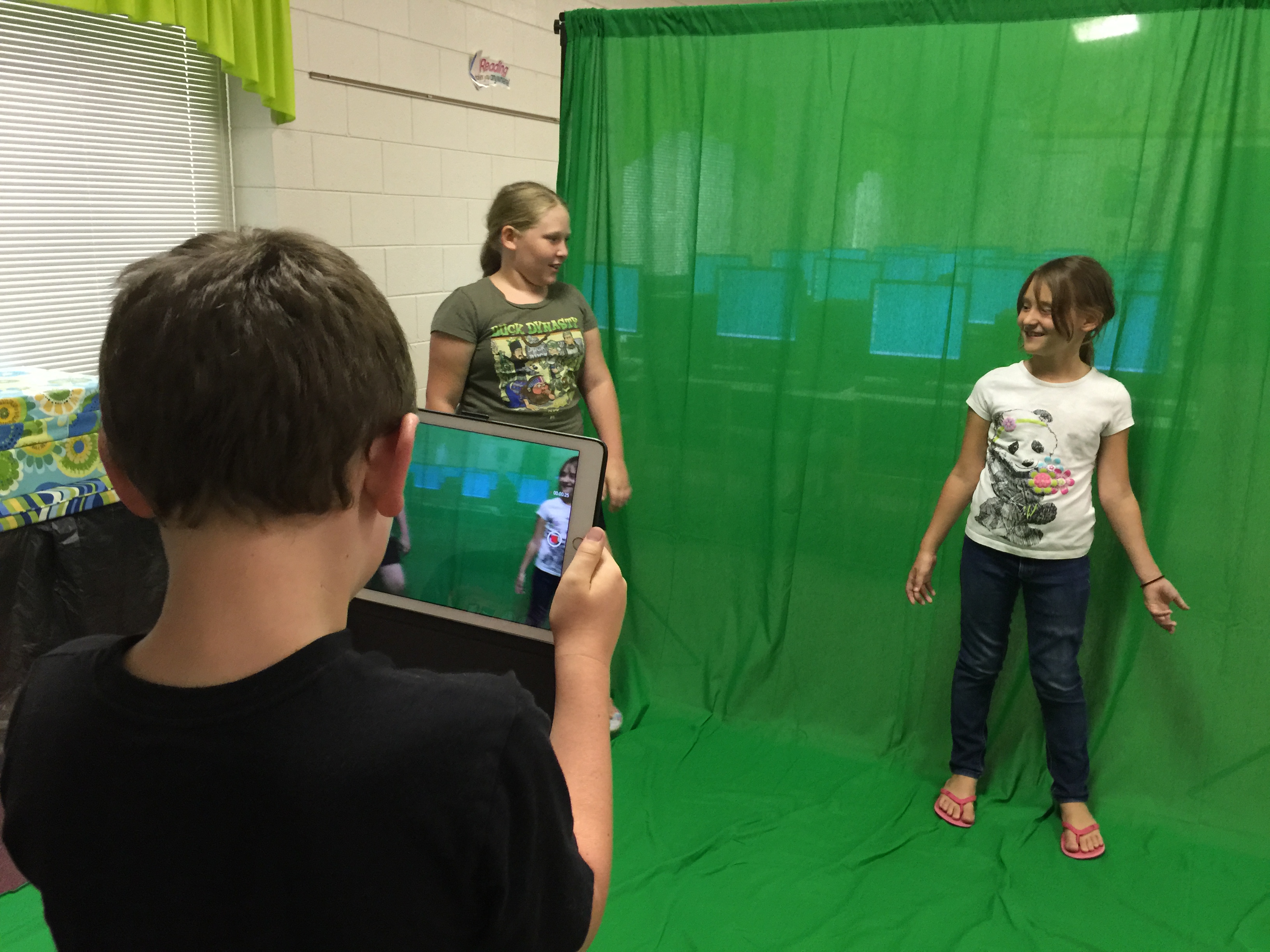
Over the course of two hours, 23 people participated in the first Summer Maker Day.  There were no major issues and things seemed to run smooth throughout the course of the afternoon.  The only thing I plan to alter for next time is the location of the Green Screen.  I am going to put it in the tutor room of the media center to cut back on noise interference in the videos and put the green screen flush against the wall as it is a pretty thin backdrop and anything behind the curtain was visible when shooting the videos.
IMG_2544

The green screen, littleBits, Makey Makey, and Snap Circuit kits were the big hits of the day I believe.  I have some true green screen pros who will be helping me teach other students in our school how to create quality green screen productions when school starts back.  Our next Maker Day is in July, and each of these families said they would definitely be returning for it.  I’m looking forward to watching these days grow in popularity as word spreads about the quality time spent between student and parent.  My principal suggested doing a Maker Day for teachers to encourage usage of materials in the classroom and curricular connections.  I think the staff at my school will love these new materials!

#EdCampMaker

My first experience at a “themed” EdCamp was nothing short of wonderful!  The team that put EdCampMaker together really outdid themselves.  After a somewhat slow start due to a bad wreck on the interstate and multiple events on Elon’s beautiful campus, the organizers decided to change the rules a bit.  Rather than having multiple break-out sessions, we opted to stay together as one big group sharing ideas on various topics throughout the day.

Check out the session board and collaborative notes here.

We began with an activity involving 30 spaghetti noodles, one string of yarn, a long piece of scotch tape, and a marshmallow.  Directions: create the tallest tower of spaghetti noodles with the marshmallow at the top; height of tower will be the distance measured from bottom of marshmallow to top of table.  My group, which included the fabulous Chris Tuttell (@tuttelltweets) had a spectacular idea to create tripods of spaghetti noodles using tape to bind them together.  We failed to place the marshmallow on top until the final seconds, only to find our tower was not strong enough to hold the marshmallow up.  After a brief discussion amongst the EdCamp group, we decided that sometimes simple is best.

Then, we began to delve into discussions around makerspaces, what works and what doesn’t.  We talked about how to better our own makerspaces and how to empower our students to unleash their creativity.  One of the Board Members of Elon University posed an excellent question about placing tutorial videos on YouTube of various makerspaces.  I thought this was a brilliant idea; it seemed so obvious, but I believe we all felt that mouth wide open – Ican’tbelieveIdidn’tthinkofthat – moment.

The remaining sessions were Community Spaces, Coding, Minecraft, Robotics, 3D Printing, and Soft-Making (crocheting, etc).  I was the most excited to gain more knowledge about 3D Printing.  Great resources are available for 3D Printing, and many can be found on the collaborative notes for that session.  Perhaps one of my favorite parts of the day was actually the name badges.  The coordinators of EdCampMaker spent the time creating each participant a name badge made from a 3D Printer.  Then we had glitter pens to decorate and make it our own!  I seriously felt like a little girl again playing with the glitter glue.  Other EdCamps are really going to have a hard time impressing me with the name badges.

Finally, the end of our day was spectacular.  We were able to “plearn” (Play + Learn…one of my new favorite words thanks to Twitter) in various makerspaces in the conference room.  We got to play with a MakeyMakey, a 3Doodler, an Osmo, Minecraft, LittleBits, 3D Printers, and a Sphero Ball, just to name a few!  I made some awesome glasses with the 3Doodler and fell in love with the Osmo.

Let me just say that I have never won a door prize at an EdCamp before… this was my 5th EdCamp experience, and I always walked out without so much as a t-shirt or bag swag… This EdCamp ended that streak.  In true Oprah fashion, “You get a MakeyMakey, and You get a MakeyMakey, and You, and You!”  Yep – that happened!  Each person at EdCampMaker got a MakeyMakey to take home!!!  As if it couldn’t get any better, I also won (genuinely won per ticket drawing) the 3Doodler Pen with filament!!!  I get to make even more of those cool glasses at home!  My students are going to be so thrilled to get to “plearn” with these new gadgets in our own makerspace at school!  Somehow I also ended up walking away with a Tinkercad shirt, too!  Remember that I mentioned falling in love with Osmo while there… I ended up buying one as soon as I got home.  It came in last weekend and my 5 year old daughter and I have been playing with it since!  She begs me to play the Osmo.

My biggest take-away from this EdCamp, besides the awesome prizes and swag, was that Makerspace isn’t just the future anymore; it’s what’s happening now in education.  All the ‘cool kids’ are doing it. I believe MakerEd takes engineering, problem-solving, creativity, and critical thinking to levels that we cannot fathom on a standardized test.

Beware! Shameless Plea for Donations Ahead: I have written two grants to get my school more materials for MakerEd.  I am still hoping one, or both, will be funded. In my high-poverty rural school (96% free and reduced lunch), I can’t and won’t ask the parents to supply my makerspace.  If you’d like to help my students reach their fullest potential, please consider donating to my DonorsChoose project, which only has 35 days remaining (ends on June 15, 2015).

NCTIES2015

It has been nearly 2 weeks since the NCTIES conference in Raleigh, but it has taken that long to take all the amazing things I learned and sort them into a blog post.  I had heard about the “big technology conference” in Raleigh for years, but never had the opportunity to go.  I was determined this year that I would go, even if it meant taking personal days and paying for everything myself.  I was told that if I submitted a proposal to present and it was accepted, NCTIES would give me complimentary registration for the conference.  I created two proposals in the hopes that one would get accepted.  To my surprise, both were accepted and NCTIES took on a whole new priority for me.  My district does a Teaching and Learning Conference in the weeks before school starts back each year, and I was asked to be on the planning committee for the 2015 conference.  I was beyond thrilled; my proposals had been accepted and I had a way to get to Raleigh!

From the beginning, the conference was amazing!  The Opening Keynote was Kevin Honeycutt, who is energetic, enthusiastic, and passionate about education.  I laughed and I cried within the first 15 minutes.  The first session on the schedule for me was my own session – Makerspaces on a Shoestring Budget.  The session was designed for elementary teachers and media coordinators who knew nothing about makerspaces and wanted to start one as soon as they got back to their school for free!

Upon wrapping up my session, I wanted to hear more from Kevin Honeycutt, so I went to his session about adding Art to STEM.  I love the idea of letting students be in charge of their own learning and allowing them to incorporate their own artistic nature into projects they complete.  I stopped by a student showcase and had a second grader tell me about 3-D printers and LittleBits.  Talk about reality-check… if a second grader can explain it & why it matters to her learning, my students should be doing it.

After lunch, I went to a session that validated my personal philosophy, then I taught my second session.  For this one, I partnered with my Exceptional Children’s Teacher, who is exceptionally amazing!  Our session, 8 Ways to Assess Without Tests, was designed to show educators that paper/pencil, multiple-choice tests are not the way to show student mastery.  Instead, use some engaging Web 2.0 tools to do formative assessments.  Each of the 8 ways we discussed has an analysis function, so teachers can focus more on the excitement of the students rather than the ‘assessment’.  Teachers can analyze the data rather than spend all their time collecting the data and scoring it.  My last session of the day was on Coding in the Media Center.  I had approximately 300 students participate in Hour of Code last year using code.org, so I was excited to hear about other coding programs and how other media coordinators were using it.  The presenters, Robin Williams and Pam Lilley, are friends of mine from the NCDLCN, so it was great to support them and learn something at the same time.

My brain was overloaded after Day 1 of NCTIES.  I went to eat with the TLC Planning Team, then went to the Digital Jam to meet up with my NCDLCN friends and network with others.  It was a great time of card games, networking, and relaxation.

The next morning, I was geared up and ready for Day 2.  The session in which I learned the most was Teaming with Media/Technology for Inquiry in the Elementary Classroom.  These two ladies from Rowan-Salisbury Schools had terrific ideas for implementing inquiry-based, problem-based, and project-based learning in a truly collaborative fashion with classroom teachers.  I am so excited to use these ideas in the coming weeks and prepare for next school year!  Finally, I hit the Best of the Web session with Richard Byrnes and Lucas Gillispie’s EPIC Academy session on Personalized Gamified PD.  Finally, I went to Learning with a Twist of STEAM presented by Steven Anderson (@web20classroom).

Speaking of Lucas Gillispie, he created a whole new layer of fun at NCTIES this year.  In an effort to force people out of their comfort zone and meet new people, he created a Conference Quest for anyone who wanted to spice up their experience.  We did quests like “give a random stranger going the opposite way on the elevator a high-five and have a witness sign the back of this card” and “put money in the vending machine for the next person who visits the machine”.  Some required signatures, some required you to tweet a picture with the hashtags #ncties15 and #cq and some even required someone else to tweet a picture with those hashtags!  Go ahead… search Twitter for #cq and see what comes up – we had a blast!

This whole experience was a time of professional and personal growth.  When I started teaching nearly 10 years ago, I never expected I would find myself attending the biggest technology conference in our state, much less presenting sessions at it.  It went well though – I survived & met amazing people who attended my session as an additional perk, and who knows… I just might do it again.