#DBC50Summer 16/50: Launch

When you open a book and literally start nodding in agreement with the very first sentence, you know you’re in for a wild ride.  That’s exactly what Book 16 in the Dave Burgess Consulting, Inc line up did!  Launch by John Spencer and AJ Juliani could not have come at a more perfect time this summer!  Big things are in store after reading this one!

launch

This book is everything I want my daughters experiencing in their education.  It describes everything I want the media center to be for students… really, everything I want SCHOOL to be for students.  I’ve never really gotten into any of the “design thinking” protocols because they are so wordy… everything-“tion”… ideation, creation, reflection – my students needed a translaTION to understand half of it.  None of the ones I had seen really fit for middle school students; they were either too elementary or too difficult to understand.  Our school has been trying to find a new engineering/design process to implement and immediately upon seeing the LAUNCH cycle as described by John & AJ, I texted my principal.

The plan of implementation for this book will be school-wide!  The School Improvement Team (SIT) met last week; on the agenda was reviewing and selecting a design process as our current process is 10 steps long and just too much for our students. They didn’t see anything they were married tom so they began creating a mash-up of a few of the processes they saw, but it’s not been finalized!  With that in mind, I hope to have the opportunity to present the LAUNCH cycle to our SIT team as an option for our school’s design process.  I immediately fell in love with the process and the ease in which it can be implemented, and I believe our staff will too.

L – Look, Listen, Learn

A – Ask Tons of Questions

U – Understand the Process or Problem

N – Navigate Ideas

C – Create a Prototype

H – Highlight and Fix

LAUNCH to an audience.

At the end of last year, my principal requested that we begin thinking about a way to bring a focus of research skills back to our school.  When I saw that the U in LAUNCH relates directly to various types of research I all but squealed with joy!  The research methods discussed by John and AJ are exactly what I want my students to walk away knowing.  Research isn’t always about looking online or looking in a printed article or book.  Research is about learning.  It can happen in the form of an interview, watching multimedia, even action research with observation or through a hands-on experiment and collecting data.  This book came at the absolute perfect time, and I am so excited to share all I learned with my school!  The resources that John & AJ have made available are incredible!  Check out the website for their book here, as well as the individual websites of the authors – John’s is here and AJ’s can be found here!  I could spend hours just looking at the websites!

In the off-chance that my school does not choose to implement the LAUNCH cycle, I have a backup implementation plan (because that’s just how I roll; I’ve got a backup for the backup, but no need to share that one just yet).  As a backup plan (and likely implemented regardless of LAUNCH cycle implementation), I will pursue a Global Day of Design in May using the information given here.  This is an incredible opportunity for students to use their knowledge and unlock creativity in exciting ways.  I believe that being part of something much larger than our school will engage our students in meaningful ways.  Last year we held our first official Maker Faire event.  It was a terrific event, but I believe the Global Day of Design will bring about more creative products with a bigger purpose behind their creations than just the event in question.  I love that the LAUNCH cycle “ends” (we all know design thinking never really ends, but you understand, yes?) with launching to an authentic audience.  This is more than just a presentation, but actually seeing the design in action!  I believe this is a spectacular way for students to have real meaning behind their design, rather than the hypotheticals they are usually presented with.  I know my blogs being read by many of you has forced me to put much more thought into them.  Imagine how much harder our students will work when they know someone, other than their teacher and peers, are using their products.

Finally, Launch speaks multiple times about the power of challenges, risk-taking, and failure.

  • “…design thinking isn’t about abandoning the standards.  It’s about raising the standards and challenging students to think at a deeper level.”
  • “You will fail. It’s going to happen… failure is a part of the process for innovative teachers.  Each mistake is simply another iteration on the journey toward success…the only way you blaze a trail is by taking risks and failing forward.”
  • “Design thinking encourages creative risk-taking with the goal of eventual mastery.”
  • “It was the first time I had heard students talk about ‘failure’ in a positive light; they realized that creating big goals gave them the opportunity to fail forward.”
  • “…we want kids to embrace mistakes as part of the learning process… each mistake is a chance to figure out what works and what doesn’t work.  When students have the permission to make mistakes, they define success as growth and learning.  They recognize that failure isn’t really failure at all”

Each of these quotes stood out to me.  Creating a safe culture where it is okay to fail is of utmost importance when implementing design thinking.  It is what I hope our media center has become in the two years that I’ve been there.

I want students to know that it’s okay to mess up, that it’s great to make a mistake, that failure isn’t final.

Launch was such a powerful book to me!  I created multiple BookSnaps and posted them on Twitter, check them out!


Be sure to join the #LaunchBook community on Twitter as they discuss Design Thinking, creativity, and bringing out the maker in every student.  Follow both John & AJ on Twitter, at @spencerideas and @ajjuliani, respectively.  The Flipgrid is available, as always, as a space for global collaboration in reflection and implementation of the book!  In this Flipgrid, tell about a time you failed in the classroom!  What did you learn from it? How have you improved your teaching practice because of it?  It’s a safe space, so share, share, share!  We can learn from one another here!  The password is DBCSummer, as usual.

Andrea Paulakovich, a dear friend and vital member of my PLN, joined in the #DBC50Summer and suggested the spectacular idea of adding Flipgrid as a way to share ideas!  She’s super awesome – you should follow her at @apaulakovichIRT & her #DBC50Summer journey here!

Launch inspired another book by John Spencer and AJ Juliani titled Empower.  This book is part of the publishing company IMpress.  You can read more about IMpress here.  So why don’t you head on over to Amazon and purchase your own copies of both of these awesome books Launch AND Empower?!?!  I was blown away by Launch and look forward to rereading with my peers at work as we, hopefully, implement the LAUNCH cycle in design thinking.  I will certainly be reading and blogging about Empower once I complete the DBC books.

*Side Note: Within this book is a step-by-step process to uncover your passions… seriously, I’m not making that up!  This is another thing I fell in love with, as I plan to go through it to see if I can discover my educational passions (see Play Like A Pirate post).  How incredible would it be for our students to go through this process, too?!

The 17th book (my favorite number, coincidentally) is none other than Kids Deserve It by Adam Welcome and Todd Nesloney.  This book… well, wow… no words. Just go get it, while I reread it and try to form the words needed to describe it in the blog. Not sure it can be done. Grab your copy and settle in! You will quickly remember your WHY while you read that one!

Battle of the Books – Gamified

I gamified my Battle of the Books team using an online gamification platform.

I’m getting ready to upset a lot of people with my next statement.  I despise Battle of the Books. (waiting for the shame bell and rotten tomatoes….)  I realize some are 110% adamant about the benefits of Battle of the Books (BoB), but I struggle every year showing enthusiasm for something that I truly believe is detrimental to many students.  My reasons for not liking BoB? (So glad you asked!)

  • A required list.  Let that sink in… a REQUIRED list for reading.  I’m a huge supporter of self-selected reading.  I agree with the oodles of research that states that one way a student develops a love of reading is to choose their own books.  I – as many educators – want students to have a love of reading.  This is not only a required list, but a LONG required list.
  • TWENTY-SEVEN books for middle school in one year.  27 = 2 tens and 7 ones.  I realize these are usually phenomenal reads, but let’s think for a minute about how long is takes the average student to read one book, let alone 27.  Oh, and competition is typically before Spring Break.  This will immediately turn off many students who might otherwise be interested.  I believe it raises a concern of quality vs quantity here, too.  I’d rather see the students invest in half the amount of books, really internalizing their themes and learning life lessons through empathy for characters.  Who’s with me?
  • Retention rate of students throughout the year is low.  I may start the year with 20-30 students who show an interest in being on the BoB team.  Only 12 students are allowed to attend competition.  This isn’t typically a problem for me as I am lucky if I end up with 8-10 students on the team in March because the others choose to quit.  Why do they quit?  Read, Accelerated Reading test (don’t get me started), answer questions, repeat.
  • Let’s talk about those questions… “In which book is there a white house in the bend of a river?”  Honest.  “In which book does a character send a note to a friend through a nurse?”  True story.  How about we ask some real thought-provoking questions?  The white house was barely a blip in the story, and the note was sent to a friend because the girls weren’t allowed to see one another due to their race, so they resorted to passing notes through a compassionate nurse.  Let’s focus on what’s important in these books (like the reason behind the note, and not the note itself).

These are just a very few of my grievances.  Also in competition, we can always use the “we’re all winners” approach, but let’s be honest… unless you win & advance in a competition, you lose the competition.  Ever had to ride a bus back to school with a group of students who have spent all that time reading and studying mundane questions to have them come in last place?  Yeah – it’s not fun.

With all that said (my personal opinions), my district participates in BoB.  So… I participate in BoB.  Every year, I get a team together.  Every year, we continue the “read, answer questions, repeat” tradition.  Every year, I lose several students due to a lack of continued interest.  Last year, I decided to try something new.  I had dabbled in this idea while working at an elementary school, but really dove in this past year.  We didn’t practice from August until February.  You heard me.  No practice… My students had so many extracurricular activities, and those that really would have success comprehending the books were the students who were involved in Robotics, Drama, Debate, various athletics, etc, etc.  I agreed that if the students would read the books on their own and complete projects, we would meet virtually, with no physical practices until the final team of 12 was chosen – typically in late January, early February.

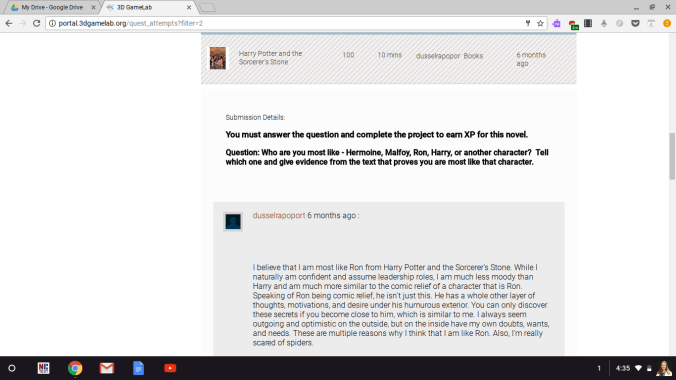
How did I ensure that the students were reading the books in the meanwhile?  I gamified Battle of the Books using Rezzly, formerly known as 3DGameLab.  This platform allows me to create quest chains in which students complete quests to earn badges, achievements, and rewards, which also equates to experience points (XP).  Each student who showed interest at the beginning of the year received the log-in information.  They learned about BoB through a quest, learned how to earn points through a quest, and learned how to earn additional XP through a quest.  For each book, there was a thought-provoking question and a short project (a service project, a research project, a collaborative project, etc) that must be completed in order to earn the badge and XP for that book.  I attempted to create questions that were similar to questions in ELA class, thus targeting specific skills as needed.  There were NO Accelerated Reader tests… I repeat, NO Accelerated Reader tests.  In order to keep the landing page from overwhelming students, they were presented with a quest called “Are You In” first.  This outlined the basic ideals behind BoB and presented them with the opportunity to opt out or opt in.  If they opt in, basic information on Rezzly was available as a quest, as well as a quest for their first book (usually a shorter book, or a book with a fairly straight forward project attached) as a starting point.  From there, it would spread as the branches of a tree, allowing the student more choice in selecting the next book.

Screenshot 2017-08-06 at 4.32.30 PM

Examples of quests can be seen below.

Screenshot 2017-08-06 at 4.33.57 PM

Screenshot 2017-08-06 at 4.33.09 PM

Upon completion of the question/project, they would submit the quest.  I was then able to approve or return the quest.  I would return the quest if it was evident the student struggled with the response (typically reflecting a quick skim of the book), and would approve if it was sufficient.  If the response was exemplary, the student earned awards, such as a gold coin, which earned additional XP.

Screenshot 2017-08-06 at 4.35.52 PM

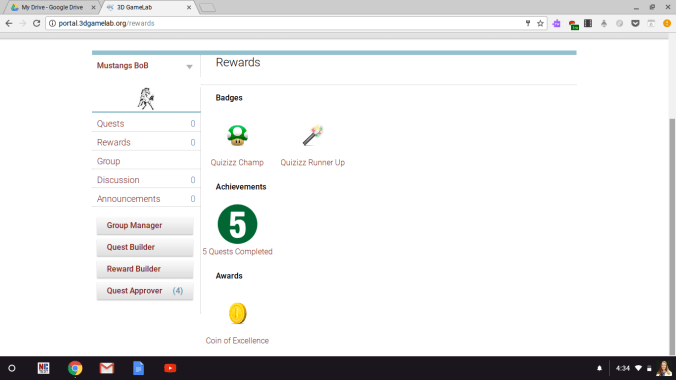
Various badges, achievements, and awards were given as additional forms of XP and bragging rights for those who earned them.

Screenshot 2017-08-06 at 4.34.09 PM

As students completed all 27 books, they earned a Bookworm badge with 200 additional XP.  Then they were presented with new quests that encouraged students to think of comparisons and contrasts between two or more books on the list and reflect on those similarities and differences.  Finally, the top 12 students were chosen in late January/early February.  These were chosen with as much objectivity as possible.  Basically, the 12 students with the highest XP were on the team and would attend competition.  The top 6 students were designated as mentors.

Screenshot 2017-08-06 at 4.34.23 PM

I must also mention that we had a guild (basically a virtual meeting space) available on our district LMS page.  This allowed us to have conversation in discussion boards, polls, and share our projects with one another on a virtual platform, which took the place of practice until the month before competition, freeing those students to participate in other extracurricular activities.  We met twice a week for the 4 weeks prior to competition to perfect the dynamics of the team and participate in mock battles.  After competition, we had a party, celebrating one another and what we had learned thanks to these books.  I guarantee you that my students learned more than there was a white house on the river, and they understood significance of a note being passed between these two girls.  We didn’t win the competition; they won so much more.


Media Makeover

There’s a saying “form follows function”.  I’m sure you’ve also heard “if you build it, they will come”.  Basically, my media center needed to reflect the changes that we hoped the pilot would bring to the culture of the school and the vision for media centers throughout the district.  The media space at my school was perfect for the school when it opened in 2000.  Based on new trends in education, and push for Future Ready schools, the use of the space was no longer adequate.  The physical space desperately needed to be updated and the collection needed to be heavily weeded.

Makerspace

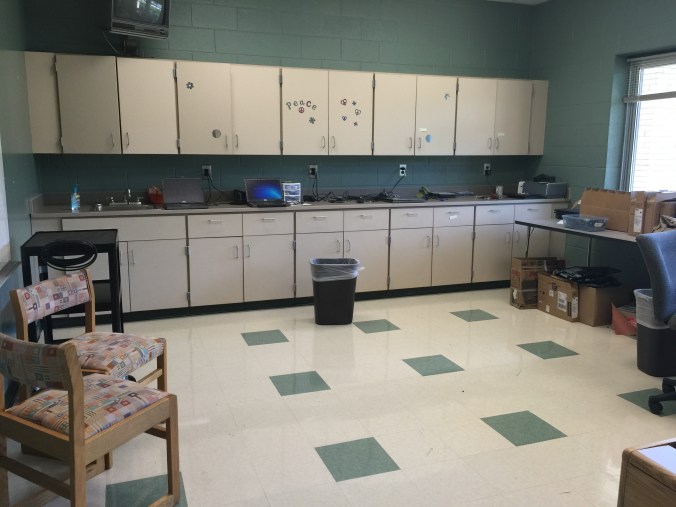
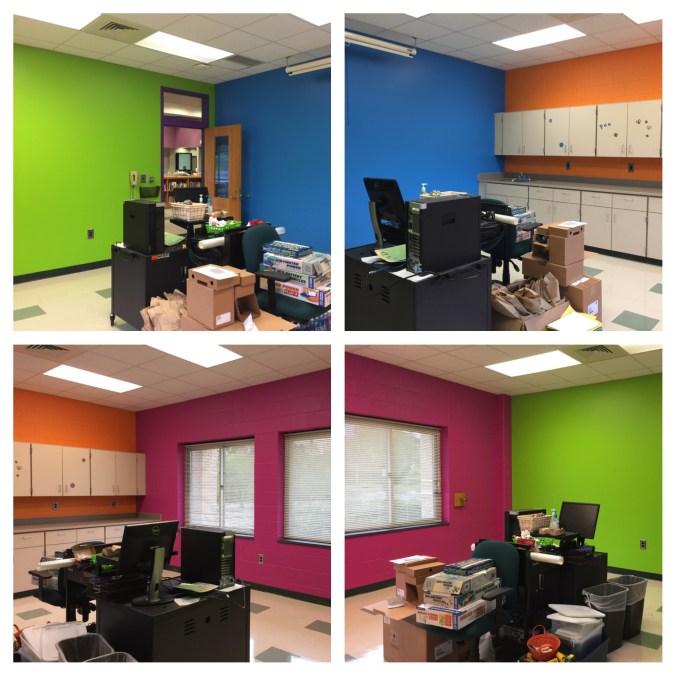
We started with a good-sized classroom off the media center.  It previously functioned as the technician’s workspace, but I immediately envisioned a makerspace there.  It already had a sink, tile floors, a solid wall, and lots of storage.  I was also trying to break the habit of sending broken chromebooks to the media center, so I felt that having the technician in that space was counter-intuitive.  The technician at our school graciously moved to another space in the school, and a fresh coat of paint, in some pretty cool colors was the beginning of a makerspace.

IMG_4841

Before

IMG_4842

Before

IMG_5825

After: painted and ready for materials

Virtual Reality Room

The next room on the list was the periodical storage room.  This room was full of classroom book sets, old magazines, manipulatives, old textbooks, and so much more.  I found that teachers didn’t even know what all they had at the school as it was all stored in the media center.  So many teachers were excited to come pick out what matched their curriculum and take it back to their classrooms.  As a teacher, unless I saw it in my classroom, I would forget it was available to me.  I think many of these teachers operated the same way.  Now the manipulatives and many of the book sets are in classrooms.  Textbooks were sent back to the district warehouse.  Old magazines were placed in the makerspace for projects and teachers were directed to the online content.  What teachers did not want, or no longer matched with the curriculum, the students took home.  We transformed this room into the Virtual Reality room (more information on that in a later post).

This slideshow requires JavaScript.

Storage

I won’t add images of the storage space as this space was used as a storage space for the school it seems.  There were so many pieces of outdated or broken technology that I asked our central office to sort through the materials and properly remove anything that could be removed.  My assistant superintendent was also kind enough to help me sort through the professional collection to focus on our district initiatives and provide our staff with the most current literature from well-respected educators.  There is an ancient white computer that has become a discussion piece as we still use it to power the poster maker!  My students love to glance in the storage room at the “dinosaur” and I have used the floppy disks that accompany the computer as talking points in several lessons.  Otherwise, most of the space was cleared out and now that all Chromebooks have been turned in for the summer, the once empty shelves are full of Chromebooks waiting for school to start again.

My Office

I really struggled with what to do with my office.  I’ve never been the type to sit in an office to work; I’d rather be visible in the media center.  I considered turning this space into another student space, a quiet study room or a space for reading.  The more I considered the space, I decided to keep it as my office for now.  All of the equipment to repair books, prepare books for circulation, and any files that needed to be kept are housed in my office.  I also keep the professional books I have purchased here so that they are separate from school-funded books.  Any materials that are not ready to be placed in the makerspace and my breakout boxes that I loan to teachers are also housed here.  Finally, I house my more expensive equipment here, behind the locked door to prevent theft or accidental breaking.  This space may eventually evolve into another space for students, but for now it remains my office.

Media Space

This space deserves an entire blog post in and of itself.  For now, the quick version is that after weeding due to age, condition, and circulation, and after adding another shelf to each case to eliminate unused space, I was able to remove 2 12-foot long bookcases, 1 9-foot long bookcase, and 24 feet of bookcases on the walls.  The corners of the media center were dark and everything felt so cluttered.  Now it is open and airy and there are so many exciting places for students to sit and read, work on projects, collaborate, and have class.  Look for a post in the near future about specific changes in the media space.  For now, enjoy some pictures of the space from my first day at work to phase one of the media space changes.

This slideshow requires JavaScript.

What comes next?  This year I am installing a Minecraft lab of 10 computers.  These computers will likely run an eSports league as well.  I’m excited to build a large Lego wall and extend the makerspace with the help of my Makerspace Mentors.  I am also looking to begin the transition to having all my furniture on wheels.  Because my school is located near the center of our district, the media center is frequently used for large meetings.  Furniture on wheels would make things so much easier!  I’m also eager to put in a comfortable reading area in one of the alcoves near the interior windows.  There will be more “comfy chairs” (students’ words, not mine) available in the media center as well.  Finally, on the big screen TV, I will have announcements of happenings around the school, as well as a showcase of awesome work from students and teachers.  Stay tuned!