Learning on the Oregon Trail

OregonTrail

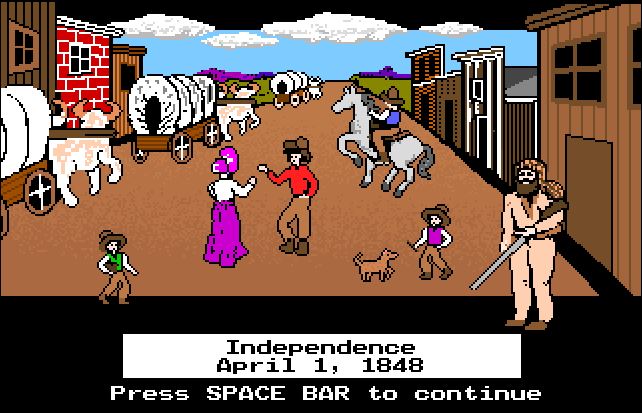
If you went to elementary school between 1990-1996, you probably remember playing computer games to enhance your educational experience.  I did… I remember playing Oregon Trail at least once a week, trying my best not to die of dysentery and wondering if I had purchased enough oxen, wishing I could carry more than 3 spare wagon wheels on my journey across the Wild West.  We also played relics like Treasure Mountain, Where in the World is Carmen Sandiego, and Number Munchers.  Apparently there are a ton of old computer games that have been archived.  Thanks to Internet Archives, the Oregon Trail is accessible to students again!  As I just played the original Oregon Trail from 1990, I was thrust back in time to my elementary AG class (Yes, I was that kid).  Students (or adults at home who are just as excited as I am right now) can now play the original version or the “updated” Deluxe version, along with several other old MS-DOS computer games, Sega Genesis games, and Internet Arcade games.  Many titles/games are not appropriate for students, as you can imagine; I would suggest linking to a specific game and not to the library of games that is available.

So I’m thinking… how can I bring back this old gem to my students today?  Will they be as enamored as I was, or will it look too “old” and pixelated to grab their attention?  Luckily for me, this is my last week with my 3rd-5th grade students and I am certainly going to find out.  You see, at the end of the school year, I like to give each of my classes the freedom to play board games with their friends for an entire media class (50 minutes).  I find playing games builds camaraderie among the students as the year is winding down and the end-of-year-crazy sets in.  I also enjoy popping in on games and playing with the students.  I set the timer for 10-15 minutes per game and let them play.  Most of the games can be completed within 15 minutes.  My younger students practice their math skills in Hungry Hippos, Hi-Ho Cherry-O, and Chutes and Ladders.  They use strategy in Connect Four and spatial reasoning when solving puzzles.  My upper grade students get excited about Apples to Apples, Junior so we usually play that as a class for about 20 minutes before I split them into smaller teams to keep the game going for the remainder of the class.

I think this year will be different; I’m thinking this year, we will explore Oregon Trail once again.  I am going to resurrect it for my 3rd-5th grade students.  Students will be given approximately 30 minutes to “play the game”.  As they complete their journey, they will answer some questions for future collaborative discussions.

Pertinent questions on their journey:

  • What did you choose to be (banker, farmer, or carpenter) and why?
  • Who travels with you?
  • What month did you decide to leave?  Why did you choose that month?
  • How much money did you have to spend?
  • What did you buy at the General Store before you left?
  • Did you change your ration throughout the journey?  If you did, why?
  • Did you ever stop to rest?
  • Did you stop to speak with the locals?  If so, did they help you make decisions?
  • What difficulties do you encounter on your trip?  How did you handle those?
  • Did everyone make it to Oregon safely?
  • How many miles did you travel all together?
  • How long did it take you to reach Oregon from your starting point?

After playing Oregon Trail, we will then sort into groups based on what the traveler chose to be and compare and contrast journeys.  We will put everyone who made it to Oregon with all their party intact together to discuss strategies, as well as taking those who died into a group to discuss preventative measures for the next trip.  Finally, students will write a reflection on their journey with details on their journey and if they would change anything on their journey.  At the very end of class, I will show students on a map where the real Oregon Trail led and we will discuss similarities and differences between what they experienced and what those on the Trail experienced.

I am looking forward to this week in class.  Now if you’ll excuse me, I will be playing games… errrr, researching for class.

First Genius Hour Attempt

I was in a great session about Problem-Based and Project-Based Learning at NCTIES when the presenters mentioned Genius Hour. So, I go to all these EdCamps and NCTIES conference and participate in Twitter chats and constantly hear about this thing called “Genius Hour”.  I always thought it would be cool to try, but it always seemed so difficult to manage on such a large scale in the media center so I had avoided it.  Well, this session made it sound so incredibly easy that I finally decided to try it out with my 4th and 5th grade students.  My district uses the FINDS method for research in the media center, so I was able to incorporate the research method and plug in NCWiseOwl as a resource, and as a bonus, was able to pull in Google Slides as all students have Gmail accounts in our district.  Here a quick list of my epic wins and epic fails of my first attempt at Genius Hour.

Genius Hour.JPG

Step 1:  Focus – I explained to my students (two 4th grade classes of approximately 25 students each and two 5th grade classes of approximately 15 students each) that Genius Hour was a time for them to research a topic that interested them with (almost) no restrictions.  Each student wrote down 10 things they loved, 10 things they were good at, and 10 things they wondered about.  From those lists, they looked for a common theme and chose a topic to research.  Some students really struggled with listing what they were good at, which was interesting to me.  Those that finished quickly were able to write some questions they had about their topic.  I had to narrow down some of the topics as a few were not really appropriate for school-based research.

Step 2: Investigate & Note-Taking – After allowing the students to choose their own topic (with some redirection in a few cases), I began a teacher research frenzy.  I took to the internet to find diversified, kid-friendly, elementary school appropriate websites with minimal ads on each topic… yes, each… all 75-80 projects.  Luckily a few overlapped, and a few wanted to research their family tree or interview a community member, so I was able to duplicate some sites and rely on personal interviews for others.  Overall, I found 3-4 good websites each for about 65 students.  Students were also able to use NCWiseOwl, PebbleGo, Trueflix and Freedomflix to research.  If I were in a middle or high school, I would have likely let students just run with it, but since I work with elementary students, I felt the need to really narrow down safe sites for them.  Prior to allowing them to access their chosen websites, we discussed the difference between a website with valid information and invalid information.  We talked about verifying sources and plagiarism and copyright laws.  This step took three class periods, which totally about 2 hours of true research time.

Step 3:  Develop – Students have worked this year on accessing Google Drive and using it for collaboration and creation.  My 4th and 5th graders logged into their Google Drive, created a new Google Slides presentation, and organized their information onto the slides as they deemed appropriate.  This allowed for a great discussion on a “good” slide and what is appropriate in a presentation (ie, appropriate font and font size, color selection, amount of words on the slide, etc).  Students input pictures by adding images from our school server that I had previously uploaded.  We discussed the importance of citing our sources and giving credit where it is due.  This step took approximately one hour of class time, and some are still working on their presentations from home.

Step 4:  Share & Score – Finally, students shared their presentation with me for editing and with a friend for viewing.  I feel it is important for the students to understand the difference between the functions of sharing documents in Google; they need to know that ‘can edit’, ‘can comment’, and ‘can view’ mean very different things when sharing through Google.  I scored using a very simple rubric, giving a score of 1-4 (4 being highest) on components such as work ethic, conventions, information given, sources cited, and overall impressions.

I learned so much about my students, their interests and personalities while working with them on their Genius Hour projects.  Chosen research topics ranged from famous people in pop culture, evolution of libraries (one of my personal favorites from a student who wants to be a media coordinator), how the brain works, what animals think about, sports of all varieties, using video games like Minecraft in education (another favorite of mine), family history, and how much sleep we need.  As a media coordinator, I wanted my students to learn how to use Google Drive, to research appropriately, to collect information by note-taking, and to have fun with it.  It took 5-6 sessions to complete these projects.  I think that in a classroom situation, this would be more feasible than in the media center.  I had to be very organized with the students’ notes and websites as I did not let them take home any of their work until the project was completed.  Overall I feel that it was a success, and I will certainly do it again next year.

Example:  Sleep

Example: Walt Disney

Example: Dragons