Transitions

Here we go… my very poor, horrendous excuse for my case of FtB – Failure to Blog 2016-2017.  I changed jobs.  There… that’s it.  I know what you’re thinking; I’ve heard it all year. “But this is the BEST time to blog!”, “Your reflections could help others.”, and “You’ll look back on this and be thankful you wrote about it.”  To all of that I say, “I know, I know.  You’re right.”  However, for some reason this year, it just wasn’t in me.  Professionally, this year was tough.  (To be honest, personally, this year was tough, too.)  What made this year so hard?  I couldn’t tell you.  I can’t pinpoint one particular cause; believe me, I’ve tried.  In my 11 years in education, this was one of the two most challenging years (strongly rivaling my 2nd year in the classroom).

Flashback to last summer when my phone rang as I was on my way back from EdCampSummit for EdCamp Organizers held in Atlanta, Georgia.  The number was from central office and I believed it to be one of those automated calls.  Upon listening to my voicemail, I quickly found out that I was being summoned to my superintendent’s office for a meeting the following day.  I subconsciously heard that ominous “oooooooo” sound when someone is sent to the principal’s office.  The end product of that meeting was an outstanding offer to pilot a new position in my district that formally merged the role of the media coordinator and the instructional technology facilitator (my two loves).  I was excited to lead this change for my district, but was also incredibly nervous as I would be heading to a middle school for the first time in my career.  I’d always heard that middle school is a love it or hate it position, similar to teaching kindergarten.  Some people are just born to teach those grade levels and they love every moment spent with that age group, and some aren’t and don’t… at all.  There is no middle ground.  Reluctantly, I packed up my things at the elementary school I’d only been serving for 2 1/2 years, and moved to a middle school.

I feel that I need to set the scene as this will aide in future posts.  This middle school isn’t just any middle school.  It’s also the first magnet school in my district, the first school of choice in my district.  The school itself was less than 20 years old, and the magnet was established just three years ago.  With 10 years of experience, I was coming in as one of the most veteran teachers there.  The administration in the school was new – a first year principal although she had many years in education & was the former assistant principal at the school & an assistant principal that was new to the school, coming from a high school.  Title 1 funding had just been pulled from the school due to the change in demographics.  However, both of the feeder schools for the middle school are Title 1, with one of those schools listed as 100% free and reduced lunch.  (Sidenote: Students from two feeder schools automatically attend the school and there are several spaces open for students to apply to attend.  These students are chosen from a lottery.)  All students at the school participate in the magnet program with a focus in STEM Education, which is awesome!  There is not a case of haves and have-nots in regards to access to educational experiences.  Every student in the school receives a Chromebook and they are allowed to take the Chromebook home with them for educational purposes.  The school also has a BYOD policy, two Project Lead the Way classes, and operates on a 6-block schedule, with every class being 52 minutes in length.  There are roughly 425 students enrolled in the school.  I would be the third media coordinator in four years in the school.  With the 1:1 initiative, the previous media coordinators spent the majority of their time working on Chromebooks, troubleshooting issues and replacing minor broken parts.  I needed to break that mold to allow for availability to serve as the instructional and digital coach, as well as serve as the media coordinator.

As part of the pilot position, I was to build a strong media program and begin coaching the staff, building relationships “from the ground up”.  I was so incredibly overwhelmed.  The media center space was much larger than my elementary school media center, the students were usually bigger than my former PreK-5 students, the collection was enormous, and I desperately missed my makerspace that I had created at my former school.  We had signed up for a virtual reality research project with an educational research organization, but had nowhere to put the equipment (more on that in another blog post).  I had two enormous storage rooms packed to the gills in classroom book sets, thematic units, manipulatives, calculators, old textbooks, and old technology.  Oh, did I mention that I was to distribute and manage the chromebooks in the school, which were haphazardly in bags in the floor?  I was totally lost.  My directors stepped in and helped me create an entry plan, which allowed me to focus on one thing at a time with a flexible timeline.

Throughout the year, I worked hard to earn trust from my faculty, my administration, and my students.  Although I constantly felt like I was falling face first, I reminded myself that I needed to keep a growth mindset and relied heavily on my PLN to keep me inspired.  This year has been a lesson on “failing forward”.  Now that summer has (finally) started, I feel that I can take a moment and reflect on the year, sharing what I’ve learned and some of the awesome things my students did throughout the year.  Look for more information to come, with posts on virtual reality, transforming the media space, building a makerspace, collection development, building relationships with students and staff, coaching successes and failures, and my observations from the year.

So there you have it… my FtB 2017 story – the short version.  Subsequent posts will be from the eyes of a new Lead Digital Learning & Media Innovation Facilitator at a STEM Magnet middle school during Pilot Year One.

Creating Community – A Schoolwide Project

All 270(ish) students in my elementary school collaborating on one big project over the course of a month, each part of the project relying heavily on another group doing their part.  That was my goal.  My principal had mentioned a collaborative project, and it had grabbed my interest.  I had no idea what to do from there.

One morning a few weeks later, while in the shower (where all amazing ideas are born), I had a fleeting thought about my oldest daughter’s upcoming field trip to a fire station.  This sparked a little genius hour project of my own to see the scope and sequence of the study of community helpers through elementary school.  It turns out that every grade level has some mention of community helpers/citizens woven into the North Carolina Essential Standards for Social Studies (K-2, 3-5).

So I wrote a DonorsChoose project for a Community Helper Lego Construction set and an Ozobot.  The majority of the project was funded by our friends at Paradise Games, a local gaming store in our community.  (A HUGE thank you to these guys!)  The idea?  To use Lego bricks to build a community and have an Ozobot programmed to move through it using codes created by markers.

Here was the plan:

PreK, Cross-categorical class, and Kindergarten: Research various community helpers using PebbleGo  and create a list of community helpers they would like to see in our own community

1st grade: Use the list created by PreK, CC, and Kinder to determine where those community helpers worked.  For example: Kindergarten said we need a doctor.  1st grade decided that doctors work in a hospital and a doctor’s office.  They also mentioned dentists, so we included those as well.  These buildings were compiled into a list for 2nd grade.

2nd grade: Create a blueprint for the community.  Use the Lego blocks to begin building the workplaces of the community helpers.  *This was where I saw real engineering and the STEM element of the project begin to emerge.  My students did not understand the proper way to build with the Lego blocks; they didn’t get the purpose of the overlapping of bricks to create an interlocking wall.  The walls would crumble when moved. Lots of devastated kids and a few tears, but they figured it out and created some excellent building foundations.

3rd grade: Put the finishing touches on the Lego buildings and review the blueprints for the community with a suggestion prepare for 4th grade.  This group also laid the foundation of the community (white bulletin board paper) onto two large rectangle tables in the media center.

4th grade: Place buildings throughout the community.  Heated conversation ensued about the location of the church (which was insisted upon by my 2nd grade students), the proximity of the school to the police station/jailhouse, and the ability to move from the doctor’s office to the hospital quickly.  These students also created the “sidewalks” to signify road spacing on which the Ozobot would travel.

5th grade: Using the open road spaces for the Ozobot, the 5th graders designed a color-coded roadway that allowed the Ozobot to visit all of the buildings in our community.  It started in the entrance to the community and went to every single building performing various tricks, tasks, and moving at different speeds along the way.

IMG_8424.JPG

The project took only one class period (45 minutes) for each class in the school.  There are 14 classes.  With snow delays and my media schedule switching each week, this schoolwide STEM project took nearly 6 weeks to complete.  Overall, all students in the school worked toward a common goal, collaborating each step of the way.  The younger students took delight in seeing their community helpers and the buildings come to fruition on the tables in the media center.  The workspace was out front and center where everyone could see it as they entered the learning space.  During the creation of the community, the workspace was organized chaos.  Students left it, as is, when their class time was over.  Our faculty still held meetings here, students still circulated books, and we still held media classes and small group instruction.

It is my hope that this project continues to push forward a change in school culture.  For me, this project was never about the materials (which were an awesome addition to our makerspace collection).  It was the idea of my entire school working together to make something really cool.  I almost cringe to call it a STEM project because STEM seems to be becoming another “buzzword”, a label to put on something to make it sound educational.  Truly, this project was an adventure.  This project allowed my students, in all grade levels, to see a long-term goal met with research, collaboration, creativity, and critical thinking.  It was a mess throughout much of the process, none of us knew what we were doing, and we pushed through and made a masterpiece.  Our students’ future is not about coloring in bubbles on an answer sheet, sitting in desks taking notes, and listening quietly to an adult talk all day.  Their future is about engagement, empowerment, and enthusiasm.  Through this schoolwide project, these students were all engaged, they were empowered by creating a community of their own, and they were more enthusiastic than ever before.

*Video on YouTube.

Using MinecraftEdu to Create NC Map

Fourth grade students in North Carolina study North Carolina’s geography and history.  One of my favorite parts of my job as media coordinator is collaboration with classroom teachers to bring lessons to life.  Fourth graders in my school have been learning about the three regions of North Carolina, the coastal plain, the Piedmont, and the mountain region.  Students spent several days in class researching industry, geography, and major landmarks in each region.  In the past, students have created a map on cardboard paper using various materials.  They have even created Live Museums where each pair of students showcased their learning by sharing with other grade levels waiting in the lunch line.  Fourth grade teachers at my school wanted to take it to a new level this year and allow students to create a map of the regions of North Carolina using MinecraftEdu.

I have been running a MinecraftEdu club every Friday afternoon to test out ways to use MinecraftEdu in the classroom.  My MinecraftEdu club has been exploring various lessons in the MinecraftEdu World Library and I have really seen the value in using MinecraftEdu to teach various concepts in the classroom.  When fourth grade teachers approached me about the possibility of using MinecraftEdu in this lesson, I was ecstatic.

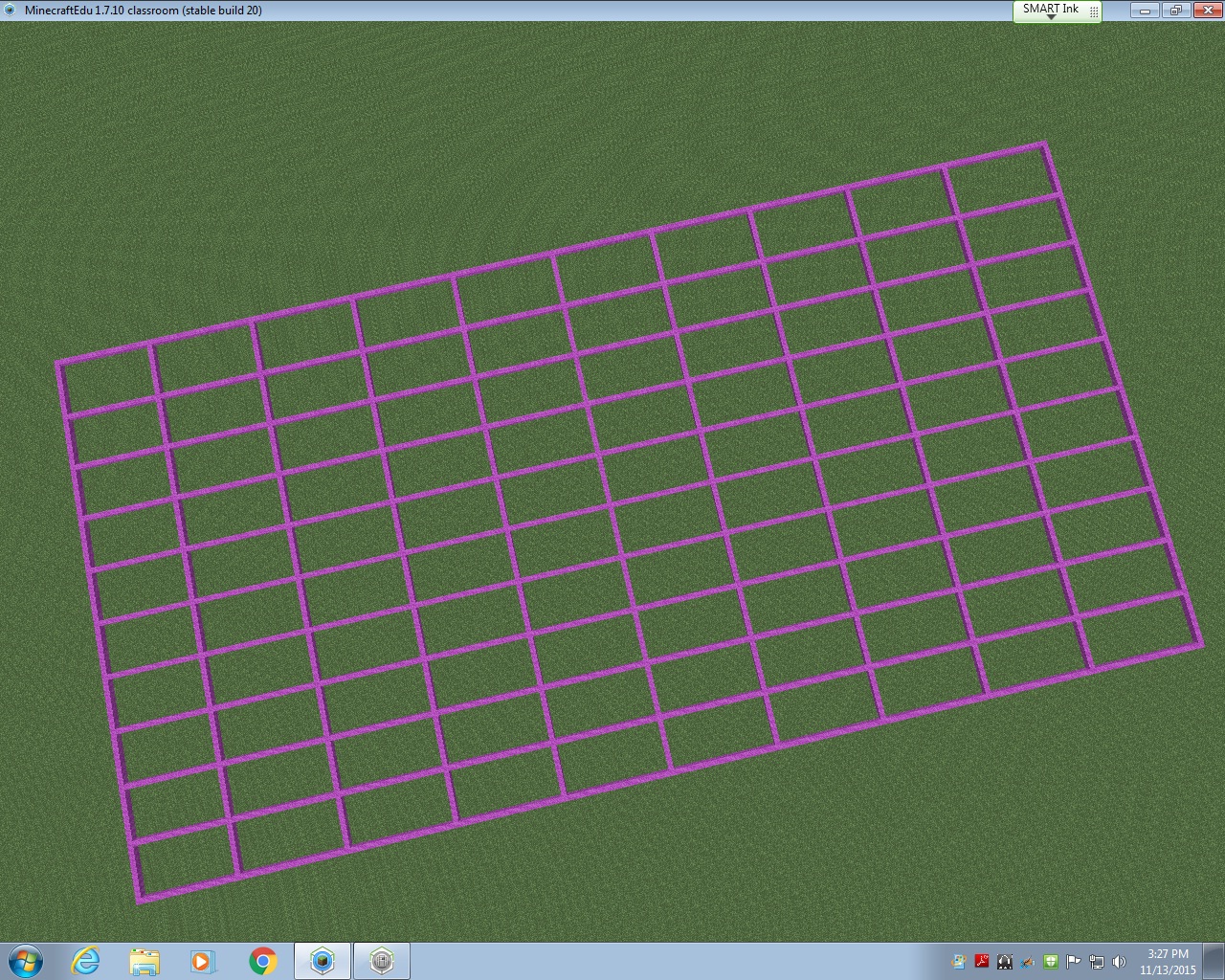
The first thing I did to prepare for this lesson was look for a map with the North Carolina border already created in MinecraftEdu.  I could not find a single one.  So, I used the Flat World (Original Style) Map from the World Library as a starting point.  Using a North Carolina map with latitude and longitude lines, I began to block off my image to transfer into MinecraftEdu.  Basically, each latitude and longitude line would be separated by 20 MinecraftEdu blocks.  This allowed me to keep the integrity of North Carolina’s shape while keeping the area of the state manageable for my students to cover in the limited amount of time they would have in MinecraftEdu.

gridlines

Once the latitude and longitude lines were in, I started outlining the state using the paper copy of the map I had blocked off.  I started on the east coast because I knew it would be difficult to do.  I would place a few blocks, then fly to see if it looked right.  Then I would place a few more blocks, and fly to see how they looked.  It was basically trial and error.  I abandoned the idea of creating the islands of the Outer Banks due to constraints in the area I had given myself.  After a few hours of work, I am pretty proud of the final product that will be uploaded into the World Library soon.

ncmap outline

From this point on, it was up to the students!  The teachers and I decided to start with the coastal region and build from east to west.  Each region was given 45 minutes to work collaboratively to create symbols of what they had learned about their region.  Students had various levels of experience in MinecraftEdu; some are in my MinecraftEdu club and some have never played before this project.  Because the coastal region was first, we ran into some quick problems with the ocean (specifically the flooding of what would be South Carolina and Virginia) and had to start completely over at one point.  Another problem we faced: I began by allowing students to remove lines of latitude and longitude if needed and upon seeing the black border of the state disappear, we started over and I told students they could not remove any pink or black blocks and they must contain the ocean in the blocks provided.  After about an hour of working (including having to restart), the seven students assigned the coastal region were finished.  They included a shark, a pirate ship, beach houses, seafood restaurants, sand for beaches, tourists tanning on the beach, and palm trees.  The ocean even had a strong current in it to represent the movement of the waves!

IMG_6635

You can see they were very particular about keeping the Piedmont region out of their coastal plain, so they went as far as to create a visible division between the two regions.  The Piedmont was next and within their 45 minutes, they created Bank of America stadium (Go Panthers!), McDonald’s, and skyscrapers.  They also created a forest of “apple” trees using oak seeds, but the oak trees overtook the skyscraper, so we had to cut down an entire forest.  This led to an spontaneous discussion about deforestation and a debate about cutting down trees vs industry, which was an excellent unexpected learning opportunity!  The seven students who studied the Piedmont also took it upon themselves to make a border so the mountain region would not build in their area.  The students were very territorial about their regions!

IMG_6636

The last region to build was the mountain region.  They discussed where the foothills would be and decided as a group (with my permission) to move the border created by the Piedmont so they could have ample room to build the mountains and have a section for the foothills.  They were adamant about having the foothills represented as that’s where our school is located.  After 45 minutes, the mountain region had created a good-sized mountain range and the Mount Airy Granite Rock Quarry.

IMG_6642

Once all students in the class had the opportunity to add something to the map, the MinecraftEdu club members put on the finishing touches.  They dubbed themselves “experts” and made everything come together nicely!  They also added a lighthouse to the North Carolina coast, the Krispy Kreme headquarters (with a donut on the top, HA), a race track to represent North Carolina’s role in the creation of professional racing, and the Biltmore House in the mountains.  The final touch was a beacon to show where our school is located in the foothills.

minecraft (1)

As I watched the students work, I was amazed at the level of knowledge they had about North Carolina’s geography, industry, and landmarks!  These students came with an idea about what they could add to the map to represent North Carolina and they worked together so well to create what I consider to be a masterpiece.  I posted several times on Twitter with updates on this project, which were shared and liked many times (thank you for that).  Each day I would remind the students that their work was being shared globally and many people were waiting to see the finished product.  The students gave everything they had to this project and far surpassed any expectations I had for this project.  Their learning is evident in ways that a standardized test could never showcase.  I am a firm believe in the power of MinecraftEdu in school and I can’t wait to work with my fifth grade teachers to create biomes in MinecraftEdu in the coming weeks!

*A link to a walk-through of the completed NC Region Map will be added soon.